



Die sichere Art, KI-Agenten produktiv zu betreiben
Die beste Kollektion geprüfter Business-Skills – jeder mit Evals, Security-Scan und Scorecard. Ein KI-Agent, konsistent über Discord, Teams, iMessage, WhatsApp, E-Mail, Web und Terminal. Mit Firmenwissen, Tool-Zugriff, Berechtigungen und EU-Hosting.
All the claw. None of the chaos.
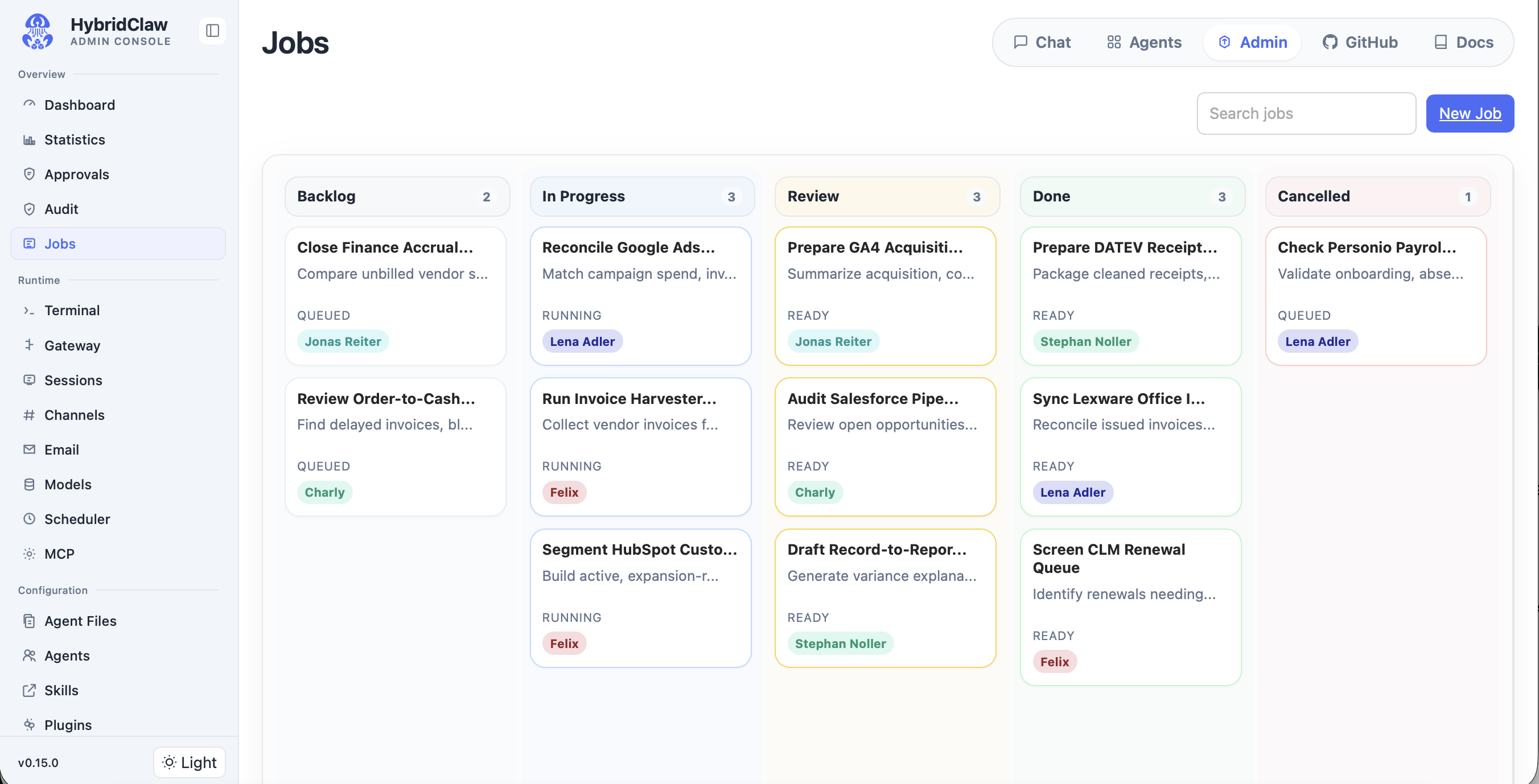
Fleet-Ansicht: Agenten, Channels, Tools und Controls – auf einen Blick.
Managed KI-Agenten, die wirklich Arbeit übernehmen: 24/7
Was Unternehmen brauchen
Warum heutige KI-Tools scheitern
Dokumente, CRM, ERP und E-Mail liegen in SilosWas Unternehmen brauchen
Warum heutige KI-Tools scheitern
Agenten brauchen APIs, Browser-Zugriff und sichere ZugangsdatenWas Unternehmen brauchen
Warum heutige KI-Tools scheitern
Secrets, Freigaben, Audit-Logs und Rollback fehlen komplettWas Unternehmen brauchen
Warum heutige KI-Tools scheitern
Einzelne Bots können keine teamübergreifende Arbeit koordinierenWas Unternehmen brauchen
Warum heutige KI-Tools scheitern
Modell-Nutzung braucht Routing, Budgets und LimitsWas Unternehmen brauchen
Warum heutige KI-Tools scheitern
Finanz- und Kundendaten brauchen NachvollziehbarkeitLightweight Runtime · Resilient by Design
HybridClaw ist eine leichtgewichtige Open-Source-Runtime mit klaren Architektur-Prinzipien für Performance, Security, Scaling und Resilience. HybridAI managed die operationale Ebene darum herum: Firmenwissen, Berechtigungen, Secrets, Audit-Logs, Observability, Telemetry, Budgets und Deployment.
Business Tools


















HybridClaw Open-Source Runtime
Erreichbar über







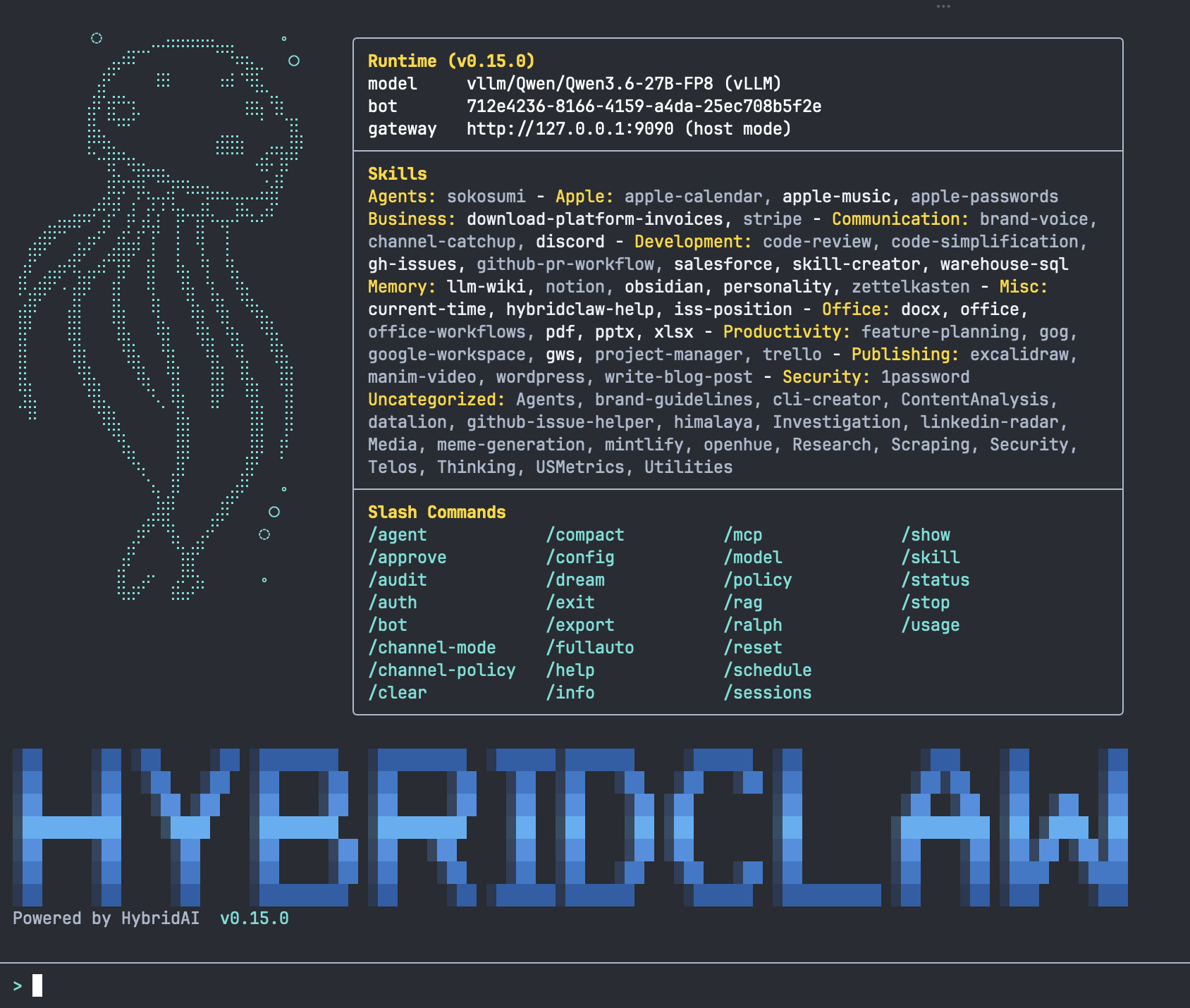
Terminal UI
Managed Control Plane
KI-Agenten
 Finance
  Sales
Sales  Support
  Operations
  BI & Analytics
  IT & Admin
  Marketing Ops
 HybridClaw ist der Motor für agentische Arbeit. HybridAI ist die Management- und Sicherheitsebene darüber. Zusammen entsteht ein Stack, mit dem Unternehmen Agenten nicht nur testen, sondern produktiv betreiben können. Evals zeigen, welche Skills funktionieren, wo Freigaben nötig sind und ob Änderungen die Performance verbessern oder verschlechtern.
KI-Agenten für Business Workflows
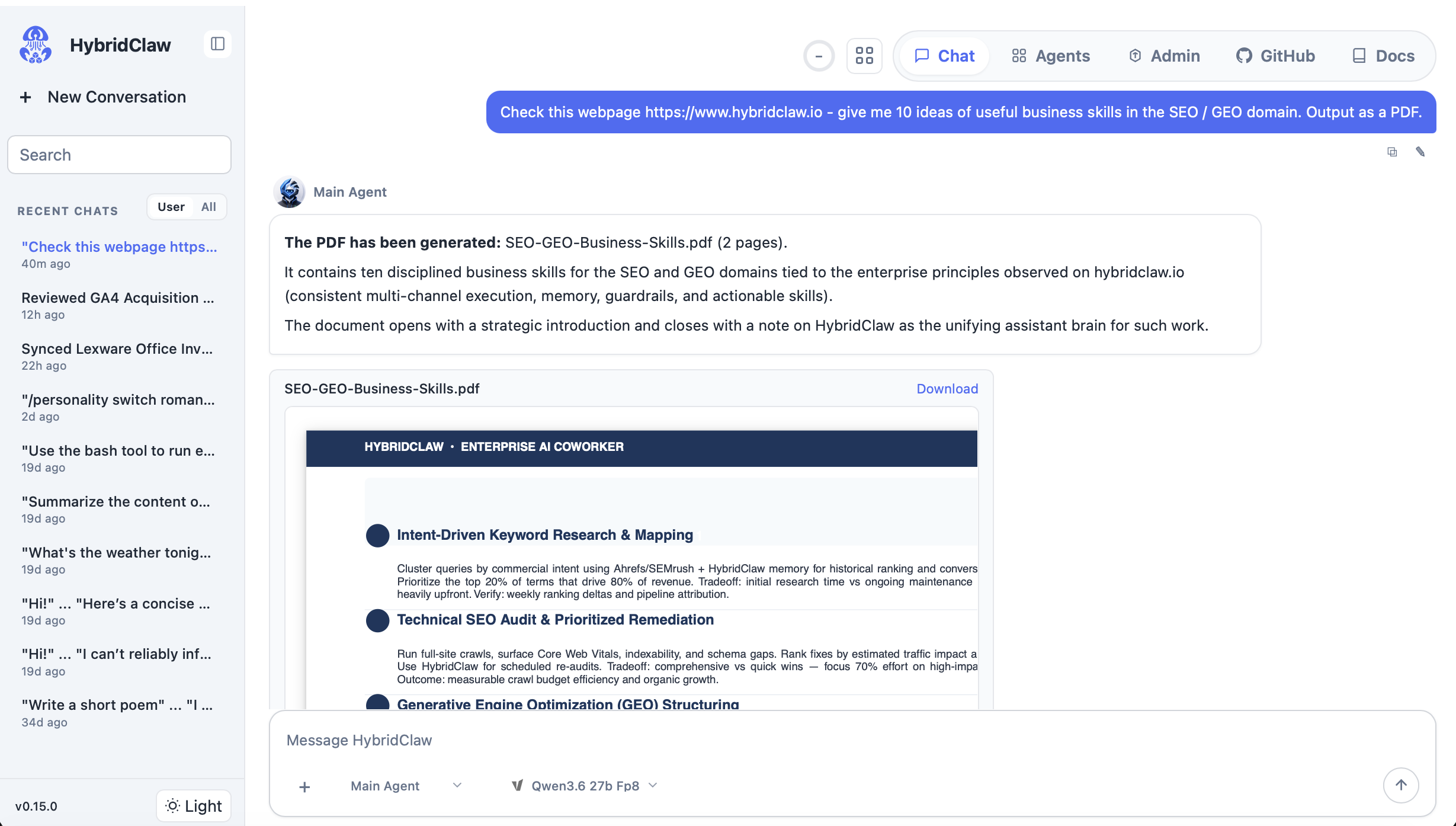
Chat-Interface: Konversation mit einem Business-Agenten über Web oder Channels.
Finance
Rechnungen sammeln, USt. klassifizieren, Übergabe an DATEV, Lexware oder SAP vorbereiten.
Sales
Leads recherchieren, CRM aktualisieren, Follow-ups entwerfen.
Support
Tickets analysieren, Wissen abrufen, wiederkehrende Fälle automatisieren.
BI
Fragen an die Daten stellen, Reports erstellen, Auffälligkeiten erklären.
Operations
Browser-Workflows ausführen, Status verfolgen, Blocker eskalieren.
IT / Admin
Systeme prüfen, Logs auswerten, Freigaben einholen.
HybridClaw in Aktion
Gebaut für produktiven Unternehmenseinsatz
HybridClaw ist nicht nur ein Interface für Modelle. Es ist ein wachsender Runtime-Stack für Agenten, die in echten Tools operieren: mit Kontrolle, Nachvollziehbarkeit und Rollback.
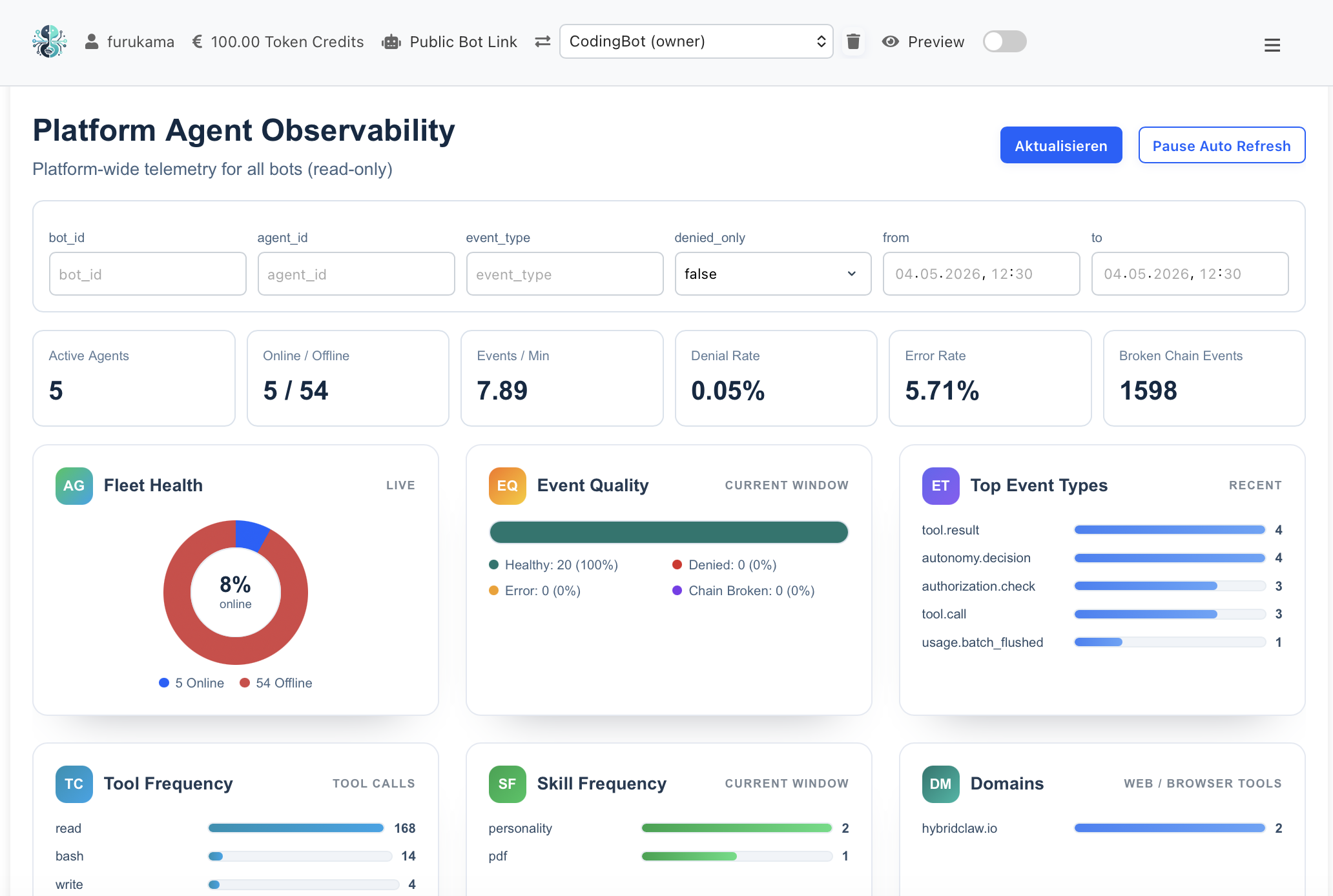
Monitoring: Latency, Cost-per-Task, Eval-Scores, Safety-Incidents – KPIs, die Operator wirklich brauchen.
Open Source Runtime
Eine offene Agenten-Plattform mit allem, was Sie brauchen, um KI-Agenten echte Arbeit erledigen zu lassen. Ohne Vendor-Lock-in.
- Über 35 fertige Skills und 17 eingebaute Werkzeuge
- Erreichbar über Slack, Teams, WhatsApp, Signal, E-Mail und Web
- Bedient eigenständig Webseiten und Tools – wie ein Mitarbeiter
- Mehrere Agenten arbeiten zusammen an einer Aufgabe
- Erledigt Aufgaben automatisch nach Plan oder Trigger
Enterprise Controls
Alles, was Compliance, IT und Geschäftsführung brauchen, um KI-Agenten ruhigen Gewissens auf produktive Prozesse loszulassen.
- Passwörter und Zugangsdaten sicher verschlüsselt – nie im Klartext sichtbar
- Lückenloses, fälschungssicheres Protokoll jeder Aktion
- Sensible Daten werden automatisch erkannt und geschwärzt
- Menschliche Freigaben für kritische Aktionen
- Vollständige Transparenz: Wer hat wann was gemacht?
Business Skills
Produktionsreife Skills für die Tools, in denen Ihr Unternehmen tatsächlich arbeitet.
- Salesforce, HubSpot und andere CRM-Systeme
- Google Workspace und Microsoft 365
- GitHub, Jira, Confluence für Engineering-Teams
- Twilio Voice für eingehende und ausgehende Anrufe
- Eigener Tonfall pro Marke. Und Custom Skills für eigene Prozesse
Evals & Reliability
Vertrauen Sie KI-Agenten, weil ihre Leistung gemessen wird – nicht, weil sie selbstbewusst klingen.
- Jeder Agent hat ein nachvollziehbares Leistungsprofil
- Tests prüfen, ob Agenten reale Geschäftsaufgaben korrekt erledigen
- Frühwarnung, wenn Modell- oder Prompt-Änderungen die Qualität verschlechtern
- Bei Fehlern lässt sich jeder Schritt nachvollziehen
- Vor dem Produktivstart: Stabilitäts- und Budget-Check
HybridClaw in den Medien
Synthszr
“HybridClaw is selling the equivalent of a TÜV seal of approval for autonomous agents.”
— Synthszr
Read coverage
LOUD LIKE LOVE
DER GRÜNE KITT UNTER DEM ARM
Auf der re:publica 26 hat ein HybridClaw-Agent live auf der Bühne einen kompletten Roman geschrieben — aus Publikums-Ideen, in unter einer Stunde, mit hermes3000.ai. Lies das Ergebnis.
„HybridClaw ist eine starke Alternative zu OpenClaw – vor allem im Unternehmens-Kontext. Besonders hat mir die Integration des Luhmannschen Zettelkasten als Memory-System im neuesten Release gefallen.“
Dr. Lorenz Gräf
Serial Entrepreneur & CEO Startplatz Köln · Gründer der größten OpenClaw Community in Deutschland
„Wir erwägen unsere OpenClaw Instanz demnächst durch HybridClaw zu ersetzen – die zusätzlichen Safe-Guards und auch einige der Features wie z.B. das Memory-System oder die Teams-Anbindung finden wir sehr überzeugend und machen es für den Unternehmens-Einsatz ideal.“
Sebastian Küpers
Founder des ersten Agentic Frameworks in DE · Gelaunched von der Serviceplan Gruppe
Wählen Sie das Deployment, das zum Workflow passt
Nutzen Sie HybridClaw Cloud, wenn Operations, Updates und Support gemanagt sein sollen. Nutzen Sie HybridClaw Self-Hosted, wenn Daten, Infrastruktur oder Modellausführung unter Ihrer Kontrolle bleiben müssen. Kombinieren Sie beides für hybride Agenten-Teams.
HybridClaw Cloud (EU)
Best for
Schneller Rollout, gehostete Updates, Support und geteilte Steuerung. Jeder Agent mit eigener E-Mail-Adresse und Telefonnummer.
HybridClaw Self-Hosted
Best for
Maximale Datenkontrolle, eigene Infrastruktur und lokale Modelle (Ollama, vLLM). Bis zu 80% Token-Ersparnis.
Hybrid Deployment
Best for
Cloud-gemanagte Agenten, die sensible Aufgaben an lokale Agenten delegieren.
Weiter eintauchen
Was HybridClaw konkret kann
Vertiefungen zu den Bausteinen, die HybridClaw vom Demo-Agenten zum Production-Operator machen.
Use Cases & Tutorials
18 produktionsreife Playbooks für Owner-, Sales-, Marketing- und DevRel-Workflows.
Mehr erfahrenArchitektur
Lightweight Runtime mit klaren Design-Prinzipien für Performance, Security und Resilience.
Mehr erfahrenSkills
35+ fertige Skills, eigene komponieren, mit Evals und Versionierung.
Mehr erfahrenMemory & Zettelkasten
Karpathys LLM-OS, Luhmanns Zettelkasten, Company Brain – Stateful Agenten.
Mehr erfahrenAuditability
Tamper-proof Logs, Skill-Scorecards, Human Approval, PII-Schwärzung.
Mehr erfahrenObservability
Latenz, Kosten, Eval-Scores und Safety-Incidents in Echtzeit-Dashboards.
Mehr erfahrenE-Mail & Telefon
Jeder Agent bekommt eigene E-Mail-Adresse und Telefonnummer mit Voice & SMS.
Mehr erfahrenManaged Cloud
24/7 EU-Hosting, Auto-Scaling, Zero-Downtime und eingebaute Compliance.
Mehr erfahrenAI-Augmented Org
Agenten als Kollegen im Org-Chart – mit Animation, Lifecycle und Governance.
Mehr erfahrenBereit für den Schritt von der Demo in die Produktion?
Zwei Wege in den Stack. Wählen Sie, was zu Ihrem Team passt.
HybridClaw Cloud
Managed Cloud (EU) auf hybridai.one: KI-Agenten produktiv betreiben. Mit Company Brain, RBAC, Audit, Evals, Budgets und eigener E-Mail- und Telefonnummer pro Agent.
HybridClaw startenSelf-Hosted (Open Source)
Open-Source-Runtime für Entwickler und Operators. Lokal installieren, Skills bauen, Agenten auf eigener Infrastruktur betreiben.
Auf GitHub ansehen Erst Developer Docs lesenHäufige Fragen zu Agenten und Agent-Infrastruktur
? Was ist der Unterschied zwischen HybridClaw und HybridAI? +
HybridClaw ist die Open-Source-Runtime für Agenten: Agenten, Skills, Tools, Workflows, Browser-Automatisierung und Agent-to-Agent-Messaging. HybridAI ist die managed Control Plane darum herum: Company Brain, Memory, RAG, RBAC, Secrets, Audit-Logs, Observability, Budgets, Deployment und Business-Skill-Management.
? Ist HybridAI DSGVO-konform? +
HybridAI ist für DSGVO-sensible Deployments ausgelegt: EU-Hosting, Self-Hosting-Optionen, Zugriffskontrollen, Audit-Logs, PII-Masking und konfigurierbare Aufbewahrungsrichtlinien. Die finale Compliance hängt vom Setup des Kunden und vom Auftragsverarbeitungsvertrag ab.
? Wie schnell lassen sich Agenten produktiv einsetzen? +
Agenten können in Minuten online gebracht und schon in wenigen Tagen produktiv geschaltet werden. Auf Basis vorhandener Skills für Finance-, Sales-, Support-, BI- und Operations-Workflows. Tiefe Integrationen in DATEV, Lexware, SAP, Salesforce oder eigene APIs werden über Konnektoren oder Custom Skills ergänzt.
? Wie weiß man, dass ein Agent wirklich funktioniert? +
HybridClaw zeichnet echte Task-Runs als Trajektorien auf und bringt sie in Form von Skill-Scores, Agenten-CVs und Regression-Checks. Jeder Business Skill kann gegen workflow-spezifische Test-Cases evaluiert werden. Teams sehen, ob ein Agent stabil genug für Production ist, welche Tasks menschliche Freigaben brauchen und ob Modell- oder Skill-Updates die Performance verbessert oder verschlechtert haben.
? HybridClaw vs. OpenClaw, Hermes-Agent und PaperClip: Was ist der Unterschied? +
HybridClaw ist eine Open-Source-Runtime für Agenten in produktiven Business-Workflows. Im Vergleich zu OpenClaw, Hermes-Agent oder PaperClip fokussiert HybridClaw weniger auf persönliches Agenten-Experimentieren und mehr auf enterprise-fähige Agent-Infrastruktur: Business Skills, Tool-Nutzung, Browser-Automatisierung, Multi-Channel-Agenten, verschlüsselte Secrets, menschliche Freigaben, Audit-Logs, Rollback, Skill-Evals, Agent-Scorecards, Budget-Kontrollen und EU-gehostetes oder Self-Hosted-Deployment via HybridAI.
? Können Skills sich selbst verbessern? +
Ja. Jeder Skill bewertet seine eigenen Trajektorien gegen die Test-Cases bei jedem Lauf. Aus wiederkehrenden Fehlerklassen erstellt der Skill Vorschläge für Prompt- oder Tool-Anpassungen, die der menschliche Skill-Owner reviewen und mergen kann. Zusätzlich überwacht ein Health-Prozess kontinuierlich Eval-Drift, Latenz und Kosten und alarmiert vor Production-Regressions. Details auf /skills.
? Wie funktioniert das Memory in HybridClaw? +
HybridClaw kombiniert vier Memory-Schichten: Working Memory für den aktiven Task, einen Zettelkasten nach Niklas Luhmann (atomare Notizen mit Querverweisen), ein Company Brain mit RAG über Dokumente, CRM und Wiki – und Cross-Agent-Sharing mit RBAC. So bleiben Agenten zwischen Tasks erinnerungsfähig, ohne sensible Daten zwischen Teams zu vermischen. Tiefer eintauchen: /memory.
? Was unterscheidet die Managed Cloud vom Self-Hosting? +
Self-Hosted gibt euch volle Datenkontrolle und Token-Ersparnis mit eigenen Modellen, aber Operations liegt bei euch. Die Managed Cloud auf hybridai.one übernimmt 24/7-Verfügbarkeit, Auto-Scaling, Zero-Downtime-Deploys, EU-Hosting (Hetzner), Long-Term-Audit-Storage und das E-Mail/Telefon-Setup pro Agent. Beide Pfade sind komplett portabel – Skills und Memory lassen sich in beide Richtungen migrieren. Mehr: /managed-cloud.
? Was steht alles im Audit-Log? +
Jeder Tool-Aufruf, jede Modell-Entscheidung, jede Freigabe – mit Eingabe, Ausgabe, Latenz, Kosten und Skill-Hash. Die Einträge sind hash-verkettet (Manipulationen werden erkannt), in der Managed Cloud zusätzlich in einen externen Append-only-Store gespiegelt und 7 Jahre revisionssicher aufbewahrt. PII wird automatisch maskiert, der Trail bleibt vollständig. Komplette Übersicht: /auditability.
? Bekommen die Agenten wirklich eigene E-Mail-Adressen und Telefonnummern? +
Ja. Jeder Agent kann eine echte E-Mail-Adresse (auf eurer oder einer hybridai.one-Subdomain, DKIM/SPF konfiguriert) und optional eine deutsche Telefonnummer über Twilio bekommen. Eingehende Anrufe werden transkribiert, ausgehende lassen sich planen, Anhänge werden geparst. Damit ist der Agent erreichbar wie ein Kollege – nicht nur eine Browser-Bubble. Mehr: /email-and-phone.
Bleib auf dem Laufenden
Produkt-Updates, neue Skills und Praxis-Playbooks – etwa einmal im Monat, kein Spam.